
What is the difference between manual, no-code, and custom automation?
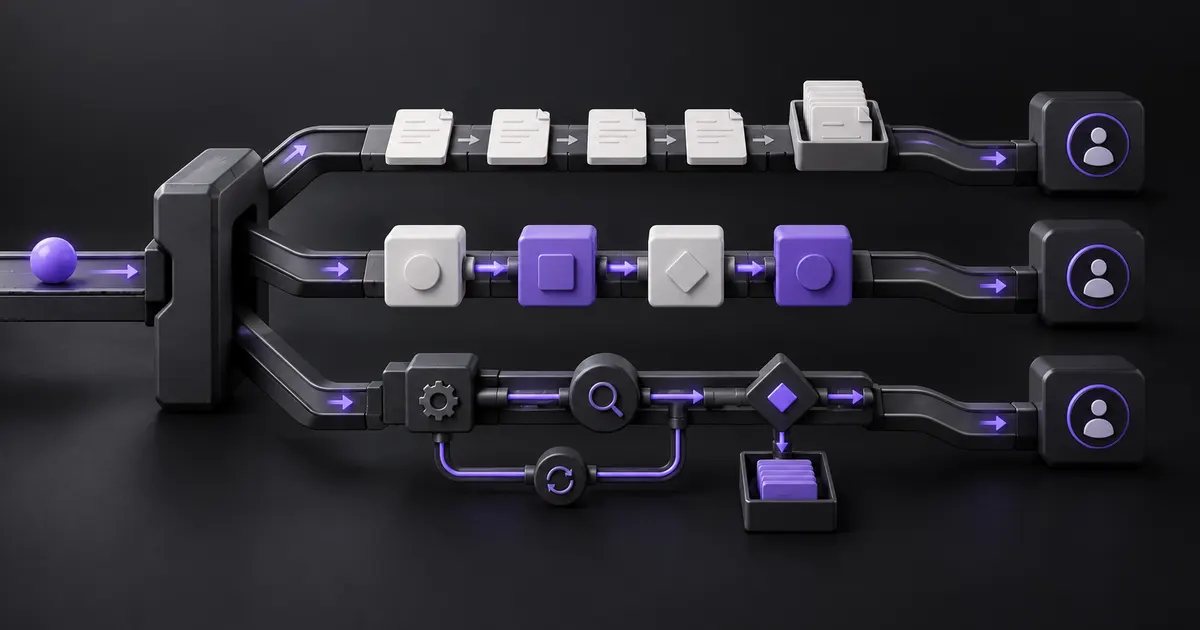
Manual work depends on a person to inspect and route each item. No-code automation expresses the route through supported configuration. Custom automation uses purpose-built code or services. The right choice is the smallest approach that can produce the required result, expose failures, and stay maintainable. Zyphh's workflow automation services start with that operating test.
For a fair comparison, hold the workflow constant. This article uses one illustrative inbound lead route from form submission to assigned sales owner. It does not use client data, a controlled benchmark, or vendor pricing. The goal is to show what changes when the same business rule moves through three different operating systems.
What lead-routing workflow are we comparing?
The comparison uses a six-stage route: capture the original request, validate required fields, check for an existing account or duplicate, apply ordered ownership rules, notify the assigned person, and isolate exceptions. Each approach must reach the same finish: one correct owner, a reason for the decision, and a recoverable record of what happened.
- Capture: preserve the source event and original timestamp.
- Validate: confirm the fields needed for routing without inventing missing data.
- Match: check for duplicates and existing account ownership.
- Assign: apply territory, segment, product, or round-robin rules in a defined order.
- Notify: give the owner the source context and next action.
- Recover: send unmatched, conflicting, or failed records to a named queue.
Keep enrichment, AI qualification, outbound sequencing, and calendar booking outside the first decision unless they are necessary to complete the route.
How do the three automation approaches compare?
Manual routing favors flexibility, no-code favors supported speed and admin ownership, and custom automation favors control over unusual cross-system behavior. None is automatically more reliable. Reliability comes from a clear rule, representative tests, visible failure states, accountable operation, and a repair path that fits the chosen approach.
| Decision factor | Manual | No-code | Custom-built |
|---|---|---|---|
| Best fit | Low volume or policy still changing | Stable rules within supported apps and actions | Valuable rules or controls that cross product boundaries |
| Rule location | Runbook, queue, and operator judgment | CRM workflow or visual automation | Versioned configuration and code |
| Main strength | People can handle ambiguous cases immediately | Business admins can change supported logic | Team can design the exact state, interface, and recovery behavior |
| Main weakness | Delay, variation, and weak audit evidence | Platform limits and connector behavior | Delivery and ongoing engineering responsibility |
| Failure evidence | Queue age, reason code, and decision log | Run history, platform errors, and exception branch | Structured logs, alerts, traces, and stored state |
| Change owner | Sales Ops or RevOps lead | Trained platform administrator | Business owner plus technical maintainer |
| Exit path | Document and transfer the runbook | Export rules and preserve test cases where supported | Document code, infrastructure, data contracts, and fallback |
When is manual lead routing the right choice?
Manual routing is reasonable when volume is low, the ownership policy is still changing, or the team needs to observe exceptions before encoding a rule. Manual does not mean invisible. A shared queue, required reason code, assignment timestamp, fallback owner, and daily aging view turn the process into evidence for a later decision.
A person can resolve context that a rule does not yet capture, such as an account dispute or a new territory. The tradeoff is consistency. Decisions can sit in inboxes, operators can apply rules differently, and the team may not know which records were missed.
Use the manual period to learn. Record the route reason, exception type, time to assignment, reassignments, and unresolved items. If the same decision repeats and the data needed for it is present, the workflow may be ready for no-code configuration. If exceptions dominate, repair the policy or data first.
When does no-code automation fit the route?
No-code fits when the trigger, data, branches, and actions are supported by the tools the team already operates. It works especially well when one CRM owns the record and a trained administrator can inspect run history, change the rule, and handle exceptions without a software release.
HubSpot's owner-assignment documentation supports assigning or rotating eligible records among selected users or teams. It also documents edge behavior: changing the owner pool resets assignment counts, and simultaneous records may wait and retry. Salesforce assignment rules evaluate ordered entries until the first match and recommend a final catch-all entry.
Visual configuration still needs engineering habits. Zapier Paths can route records through conditional branches and a fallback. Its replay documentation notes that Filters and Paths are not replayed when a failed action is retried. A repair test must confirm that the original branch is still correct and that replay cannot duplicate a downstream action.
When does custom automation earn the extra responsibility?
Custom automation earns a serious evaluation when the route depends on valuable behavior that supported configuration cannot express safely. Common signals include cross-system account matching, ordered enrichment, capacity or availability rules, idempotent writes, a dedicated exception interface, or recovery that must resume from a known state.
Custom code can store a decision version, input snapshot, matched rule, action result, and repair state. It can also fail in more ways. Someone must own deployment, credentials, tests, monitoring, dependency changes, incident response, documentation, and handover. Control is useful only when the team can operate what it controls.
AWS Step Functions documentation illustrates the mechanics available in a custom orchestration layer, including named errors, retries with backoff, catches, timeouts, and redrive. Those features do not create a sound route by themselves. The team still needs business rules, duplicate protection, a catch-all owner, and a way to verify the CRM state after recovery.
How should you compare cost and reliability?
Compare the complete operating path, not a person's hourly rate against a software subscription. Manual cost includes handling, delay, review, and rework. No-code cost includes licenses, usage, administration, integration, platform limits, and exceptions. Custom cost includes delivery, infrastructure, security, testing, monitoring, maintenance, incidents, and replacement ownership.
| Test case | Required result | Evidence to capture |
|---|---|---|
| Duplicate event arrives | One lead and one assignment remain | Deduplication key, skipped action, final record |
| Territory is missing | Record enters a named exception queue | Reason code, owner, age, correction |
| Existing account conflicts with territory | Written precedence rule decides or requests review | Matched records, rule version, reviewer decision |
| Selected owner is unavailable | Fallback route applies without losing context | Availability source, fallback reason, notification |
| CRM write times out | System verifies state before retrying | Attempt ID, response, lookup, retry outcome |
| Same item is replayed | No duplicate task, alert, or reassignment appears | Idempotency check and final-state comparison |
Run the same cases through every credible option. Record operator time for normal work, exception review, changes, and recovery. A faster build can still be the worse operating choice if routine failures require specialist repair or the evidence cannot explain a route.
What is the practical migration path?
Move one step at a time: stabilize the manual route, configure the supported path, then add custom behavior only for a proved gap. Some teams can skip a step, but they should not skip the evidence. The migration should narrow uncertainty rather than turn an unsettled process into software.
- Write the trigger, finish, ordered rules, catch-all owner, and exception route.
- Trace recent records and label duplicates, conflicts, missing data, reassignments, and late decisions.
- Test the closest native or no-code option with the failure cases above.
- List every workaround and manual repair that remains.
- Build a custom component only when the remaining gap has material value and a named maintainer.
- Keep the prior route available until the new path proves its result and recovery behavior.
Use the broader build-vs-buy automation framework when the decision extends beyond this one route into lifecycle cost, supplier risk, ownership, or exit. For this workflow, choose the least complex path that passes the same operating test. Do not choose custom because it looks advanced, or no-code because it looks easy.
What should the team decide next?
Bring one recent lead, the written ownership rules, and the current exception list to a working session. Draw the manual, no-code, and custom paths against the same six stages. Remove any option that cannot explain a decision, isolate a failure, prevent duplicates, and return the CRM to a verified state.
The likely answer may be hybrid: native CRM rules for ordinary assignments, a no-code connector for supported handoffs, and a small custom component for one valuable gap. Keep each boundary visible. A practical system is not the one with the most automation. It is the one the team can explain, repair, change, and retire.
Turn this into your own build plan.
Run the Workflow Opportunity Score or book a strategy call. Bring one repeated workflow, the tools involved, and the number that should move.
Run the scoreSources and further reading
FAQ
Is no-code automation more reliable than custom automation?
Not by default. No-code can inherit mature platform controls, while custom can provide more specific state and recovery. Either can fail through weak rules, missing data, unsafe replay, poor monitoring, or unclear ownership. Compare both with the same failure tests.
When should a team keep lead routing manual?
Keep it manual when volume is low, policy changes often, or exceptions are not understood. Use a shared queue, timestamps, reason codes, and a fallback owner so the manual period produces evidence instead of hiding delay.
Can no-code automation support a production workflow?
Yes, when the platform supports the required trigger, rules, actions, permissions, history, and exception path. A named administrator still needs representative tests, change control, monitoring, and a repair procedure. Visual configuration does not remove operating responsibility.
Does lead routing need AI?
Usually not for stable ownership rules. Deterministic conditions are easier to test and explain. AI may help interpret unstructured requests, but its output should feed a bounded rule or human review rather than silently decide account ownership.