
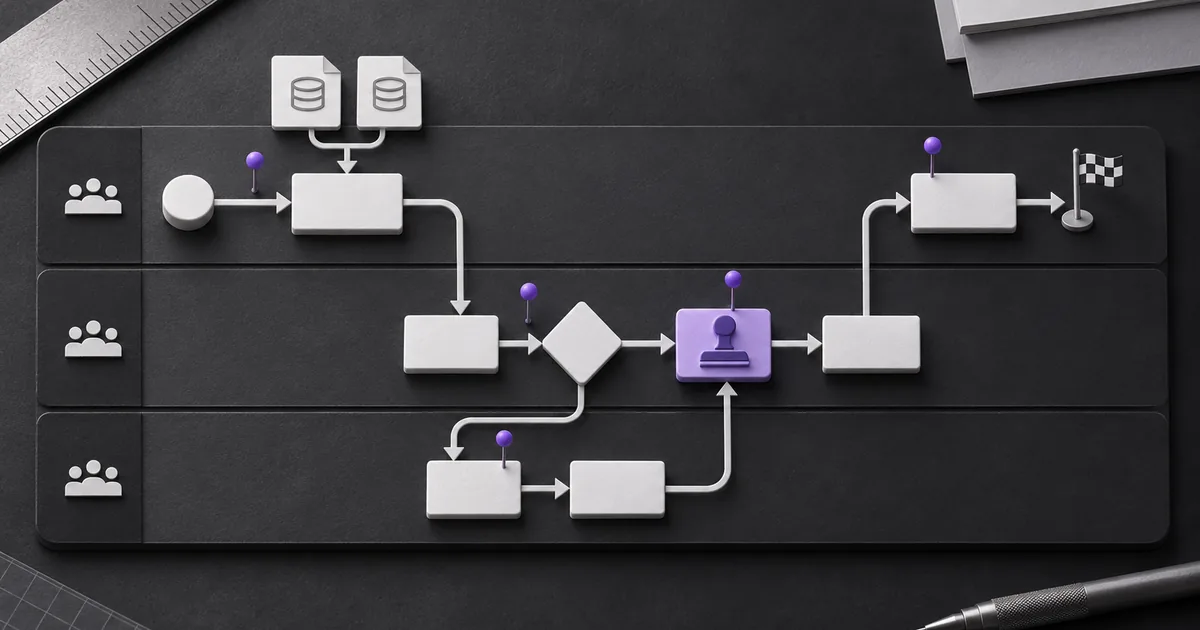
What does it mean to map a workflow for automation?
To map a workflow for automation, trace one real item from a defined trigger to a verifiable finish. Record who acts, which system or data they use, what decision they make, where work waits, and what happens when the normal path breaks. Start with the current state, not the tool you hope to buy.
This is more than drawing boxes. A useful map becomes the evidence behind scope, requirements, tests, controls, ownership, and a baseline. Zyphh's Workflow Opportunity Score can help narrow a long list to the first workflow worth mapping.
HashiCorp's current workflow-mapping guidance recommends documenting purpose, prerequisites, steps, decisions, success criteria, failures, permissions, dependencies, time, and metrics. Its examples focus on infrastructure work, but the record structure transfers well to SaaS operations.
Which workflow should you map first?
Choose one recurring workflow with visible friction, a named owner, and records you can inspect. Do not start with a department, an end-to-end customer lifecycle, or every task that touches revenue. Those boundaries are too wide for a first map and tend to hide disputed ownership.
| Selection question | Stronger first candidate | Warning sign |
|---|---|---|
| Does it repeat? | Same trigger and result occur often enough to observe | One-off project or constantly changing work |
| Can you inspect it? | Tickets, fields, messages, timestamps, or logs exist | The process survives only in memory |
| Is the pain visible? | Queues, corrections, delays, or missed handoffs can be found | The complaint is broad but no event can be traced |
| Is ownership clear? | One person owns the business result | Every team participates but nobody can accept a change |
| Is the boundary manageable? | One trigger, one finish, and a limited system set | Several processes are bundled into one transformation |
| Can failure be contained? | A human review or rollback can limit harm | A first release would make irreversible high-impact decisions |
Selection is not approval to automate. A good map can show that a required field, clearer policy, queue owner, or product configuration solves the problem with less operating burden.
What should a useful workflow map contain?
A useful map contains the flow and the facts needed to explain each step. The visual should stay readable, while a companion table carries detail that would make the diagram crowded. Together they should let another person replay the normal path and at least one exception without guessing.
| Field | What to record | Why automation needs it |
|---|---|---|
| Boundary | Trigger, finish, in-scope work, excluded work | Defines when the system starts and stops |
| Roles | Performer, reviewer, approver, business owner | Assigns actions and accountability |
| Actions | What changes at each step | Becomes workflow logic or a human task |
| Decisions | Rule, evidence, possible paths | Separates deterministic rules from judgment |
| Systems and data | Source, destination, stable ID, required fields | Defines integrations and validation |
| Time | Active work, wait time, deadline, frequency | Creates a baseline and service expectations |
| Exceptions | Missing data, duplicates, rejection, outage, reversal | Prevents a happy-path-only build |
| Access | Read, write, approve, delete, export | Sets the permission boundary |
| Evidence | Record, timestamp, policy, log, sample item | Distinguishes observation from assumption |
| Measure | Quality, elapsed time, corrections, accepted result | Shows whether the change worked |
How do you map the current workflow step by step?
Map the current workflow in eight steps: set the boundary, gather the right people and records, replay a real item, draw the normal route, add decisions and exceptions, attach operational facts, validate the map, and freeze a reviewed version. Stay in the current state until the team agrees on what happens now.
- Write the boundary. Name the event that starts the work, the observable finish, the business owner, and what the map excludes. A trigger such as a signed order arriving is testable. Sales hands it over is not.
- Bring the work and its evidence together. Include the operators, reviewer, system owner, and outcome owner. Open one recent normal item and one difficult item with sensitive data removed when needed.
- Replay one item. Follow its tickets, CRM history, spreadsheets, messages, documents, and timestamps. Ask what happened at each point and which record confirms it.
- Draw the normal route. Use one lane per role or system when handoffs matter. Add the action in plain language, then connect steps in the order they happened.
- Add decisions and exceptions. Show rejections, duplicates, missing information, corrections, outages, reversals, and escalation. Give each route an owner and a return point.
- Attach the facts. Record input fields, stable IDs, permissions, active time, wait time, frequency, policies, and evidence gaps beside the relevant step.
- Walk through the map. Ask a different operator to replay a normal and unusual item against it. Correct the map when the record and workshop memory disagree.
- Version the approved current state. Add an owner, review date, assumptions, unresolved questions, and links to supporting procedures. Do not silently redraw it as the future design.
The NIST AI RMF Playbook Map function supports this narrow, context-first approach. It calls for documenting purpose, minimum functionality, users, roles, deployment setting, impacts, requirements, and non-AI alternatives before an AI system is designed. The playbook is voluntary guidance, not an ordered implementation checklist.
Do you need BPMN or special mapping software?
No. Most SaaS operations teams can begin with boxes, arrows, decisions, and swimlanes in a shared drawing tool. Use formal Business Process Model and Notation when several teams or tools need a precise, portable process model. Notation should remove ambiguity, not make the workshop harder to follow.
| Map style | Best fit | Tradeoff |
|---|---|---|
| Plain flowchart | One team, short workflow, early discovery | Roles and data can become unclear |
| Swimlane map | Cross-team handoffs, approvals, system changes | Large maps become hard to scan |
| Service blueprint | Customer-facing work with frontstage and backstage actions | May include more experience detail than the build needs |
| BPMN | Complex events, exceptions, tool exchange, formal process work | Requires notation knowledge and governance |
The Object Management Group publishes the BPMN 2.0 specification and machine-readable documents. The specification covers business-process notation and interchange. It does not replace data models, strategy, business rules, monitoring, or deployment planning, so a perfect BPMN diagram is still not a complete automation specification.
How do you turn a map into automation requirements?
Convert every meaningful map fact into a requirement and a way to prove it. A builder should not infer what a vague arrow means, which source wins when records conflict, or who handles a failed write. Keep the requirement linked to the map step so scope changes remain visible.
| Map fact | Requirement | Acceptance evidence |
|---|---|---|
| Signed order starts the workflow | Start only when status, signature, and account ID are present | Valid order starts once; draft and duplicate do not |
| Operations checks three required fields | Validate field presence and approved formats before any write | Boundary cases pass or enter the named exception queue |
| Finance approves a contract exception | Pause and request approval from the authorized role | Unapproved exception cannot advance |
| CRM and billing IDs conflict | Stop automatic matching and preserve both source values | Conflict produces a review item and no silent overwrite |
| Customer record write fails | Retry only safe failures, then alert the owner with context | Failure test shows retry limit, alert, and recovery path |
| Completion has a named measure | Log start, outcome, exceptions, correction, and final status | Operator can reconcile a run from source to result |
The U.S. GAO AI Accountability Framework organizes review questions around governance, data, performance, and monitoring. Its federal audit context is broader than a SaaS workflow, but those four categories are a useful check on requirements that focus only on the happy path.
What does a mapped SaaS workflow look like?
Consider a fictional trial-to-paid handoff. A prospect signs an order, sales updates the CRM, operations checks the commercial record, finance reviews nonstandard terms, customer success receives the approved context, and the billing system opens the account. This example explains the method. It is not a Zyphh client process or measured result.
The first replay finds two routes. A standard order has a stable account ID and all required fields, so it moves directly to provisioning. A nonstandard order waits for finance. If the account ID is missing or conflicts with billing, operations returns the item to a correction queue rather than creating another customer record.
The future design might validate fields automatically, create the review item, and draft a handoff summary. The current map does not make those choices. It supplies the evidence needed to compare product configuration, deterministic automation, bounded AI assistance, or no software change.
Where should AI appear in the mapped workflow?
Place AI only where the task needs interpretation and the team can test the output. Stable rules, calculations, required fields, identity checks, permissions, and fixed routing usually belong in deterministic logic. Keep people in decisions that require authority, policy exceptions, customer commitments, or acceptance of material risk.
| Task shape | Likely treatment | Required safeguard |
|---|---|---|
| Exact rule with structured fields | Deterministic automation | Validation, idempotency, and failure handling |
| Drafting from approved source material | Bounded AI assistance | Source access, output checks, and review where needed |
| Ambiguous classification | AI suggestion or human decision | Representative test set, confidence rule, and escalation |
| High-impact approval | Authorized human | Clear evidence, separation of duties, and audit record |
| Unknown or rare exception | Human exception queue | Owner, response target, and feedback into the map |
OWASP's Excessive Agency guidance recommends limiting extensions, permissions, and autonomy, with human approval for high-impact actions and authorization in downstream systems. The workflow map is where those action and permission boundaries should first become visible.
What should you measure before automation?
Measure enough to compare the old and new workflow without inventing precision. Useful baselines include item volume, elapsed time, active handling time, queue time, corrections, exception types, failed writes, and accepted outcomes. Record the source and observation window beside every number.
- Volume: How many items enter the boundary, and how does demand vary?
- Elapsed time: How long from trigger to verified finish?
- Active work: How much human handling occurs, separate from waiting?
- Quality: What counts as an accepted result, correction, rejection, or duplicate?
- Exception load: Which routes occur, who owns them, and how often?
- Operating cost: Which platform, model, review, support, and repair inputs would the new workflow add?
Leave a field blank if reliable evidence does not exist. The missing measure is a finding and may justify a short observation period before build approval. A confident estimate should stay labeled as an estimate.
When is the workflow map ready for a build decision?
The map is ready when an operator can replay it, a business owner accepts its boundary, and a builder can derive requirements without guessing. It should also reveal why automation might be rejected. A diagram that hides uncertainty is not ready, even if it looks polished.
- The trigger, finish, owner, users, and exclusions are explicit.
- A normal item and at least one exception have been replayed against source records.
- Every decision names its evidence, rule, authority, and possible route.
- Systems, stable identifiers, fields, permissions, and source-of-truth conflicts are recorded.
- Waits, handoffs, corrections, failures, reversals, and escalation paths are visible.
- Observed facts, estimates, assumptions, and evidence gaps are labeled separately.
- The future design traces back to the current map, business goal, and acceptance cases.
- Operation has an owner, monitoring plan, manual fallback, review date, and retirement path.
If the boundary is disputed or the evidence is thin, stop at the map and resolve those gaps. For a deeper review that compares process repair, product configuration, automation, AI, custom software, and no change, use the AI workflow audit process. The next useful deliverable is a small decision record, not a bigger drawing.
Turn this into your own build plan.
Run the Workflow Opportunity Score or book a strategy call. Bring one repeated workflow, the tools involved, and the number that should move.
Run the scoreSources and further reading
FAQ
Is a workflow map the same as an SOP?
No. A workflow map shows how work moves across roles, decisions, systems, data, and exceptions. An SOP explains how a person performs a task. Link them when useful, but do not force detailed instructions into a diagram that should stay readable.
How detailed should a workflow map be before automation?
Make it detailed enough to replay the normal path and important exceptions without guessing. Each step should identify the action, owner, system or data, decision rule, permissions, timing, evidence, and failure route that could change the build.
Do I need BPMN to map a SaaS workflow?
Usually not. A plain flowchart or swimlane map is enough for many bounded SaaS operations workflows. Use BPMN when process complexity, formal governance, or portability between modeling tools justifies the added notation.
Should we choose an AI tool before mapping the workflow?
No. Map the current work and compare process repair, product configuration, deterministic automation, bounded AI assistance, custom software, and no change. Choosing a tool first can turn its features into requirements before the real problem is understood.